Most SigenStor installation delays aren't caused by the hardware. They're caused by buyers who skipped the panel capacity check, missed a required accessory, or didn't line up a home battery installer until after the order arrived.
This guide covers every Sigenergy installation requirement: electrical panel, mounting space, solar and EV compatibility, communication setup, and the components most buyers overlook. Browse the Sigenergy product range at Self2Solar before you order, then work through this checklist.
Home battery installation goes smoothly when you're prepared. This Sigenergy setup guide walks through every requirement. Here's what to verify.
Before You Buy: What to Check First
Getting your home ready for a SigenStor system starts with a few key checks. Use this as your pre-purchase SigenStor installation checklist before you contact an installer or place an order.
-
Electrical panel: Confirm your panel has enough capacity and available breaker space for the battery system and any new loads
-
Backup load goals: Decide which circuits you want to back up (essentials only, or whole-home backup)
-
Solar setup: Know whether you're adding storage to an existing solar system or starting fresh
-
EV charging: Flag this early if you plan to add EV charging, as it affects system sizing
-
Wall and floor space: Measure the area where you plan to mount or place the system
-
Communication needs: Check your Wi-Fi coverage in the installation area and whether 4G backup is needed
Unsure about your existing system? Check Sigenergy compatibility first before placing your order.
Main Components Needed for Installation
A SigenStor system is built from multiple components. Understanding what each one does helps you order everything upfront and avoid delays on install day.
Core Sigenergy components for a standard residential install:
-
Battery modules (BAT 6.0 or BAT 9.0): BAT 6.0 provides 6.02kWh per module; BAT 9.0 provides 9.04kWh per module. Each stack scales up to 54.24kWh total. Battery modules carry a 10-year warranty.
-
Sigen Energy Controller: the inverter and system management hub that connects your solar panels, batteries, and grid
-
Sigen LoadHub: the smart load management gateway that controls which circuits receive backup power, with 0ms transfer time
-
Power sensor: measures real-time home consumption and reports data to the Sigenergy app
-
Mounting hardware: wall-mount or floor-mount brackets depending on your configuration
-
Optional SigenStor components:
-
Sigenergy 4G Communication Module: adds cellular backup monitoring (available with 2- or 5-year service plans)
-
Sigen EVDC V2X Charger: bidirectional DC charger for EV integration (requires a complete SigenStor system with at least one battery module to operate)
Before ordering, confirm the product listing shows relevant UL certifications: UL9540 (system-level), UL1741 (inverter), and UL1973 (battery) are the key standards for US residential installations.
Understand Sigenergy system components before finalizing your order to confirm you have everything your configuration requires.
Space and Mounting Requirements
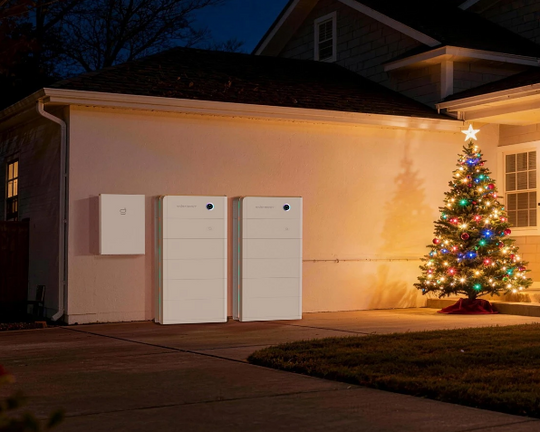
SigenStor units support SigenStor wall mount and floor-mount configurations depending on your setup. Before installation day, confirm:
-
Available wall space or floor area that meets the clearance requirements in the Sigenergy installation guide
-
A flat, structurally sound surface (concrete or solid timber framing is typical for wall mounts)
-
Enough room for cable runs to your electrical panel and any connected components
-
Accessibility for future servicing
Refer to the Sigenergy installation guide for exact clearance dimensions; requirements vary by module count and mounting type. Your installer will confirm exact placement. Shop Sigenergy mounting accessories to confirm which battery mounting kit your configuration requires before purchasing hardware.
Electrical Panel and Backup Load Planning
Your electrical panel is the foundation of your battery installation. Confirm these before you order.
Panel capacity: Your panel needs to support the combined load of the SigenStor system, your existing circuits, and any new loads like EV charging. For US residential installs, SigenStor integrates with standard split-phase 120/240V service. The total draw depends on your configuration and number of battery modules; your installer will calculate the exact amperage requirements. Confirm your panel's available breaker space and service rating early in the planning process, as underpowered panels may require an upgrade before installation can proceed.
Regulatory requirements: Residential battery systems fall under NFPA 855, which sets installation limits, location rules, and interconnected smoke alarm requirements that govern how and where your system can be wired. For large multi-module stacks, NFPA 855 also sets indoor storage limits per protection area; installations exceeding those thresholds may require additional ventilation or fire suppression measures. Discuss your planned stack size and install location with your installer before finalizing placement. Your installer is responsible for code compliance, but knowing these rules helps you ask the right questions during the site visit.
Backup circuits and load planning: The Sigen LoadHub handles electrical panel battery backup by controlling exactly which circuits receive power during a grid outage. It supports both whole-home and partial-home backup, with 0ms transfer time so there's no interruption when the grid goes down. Backup load planning happens before installation, as it determines how the LoadHub is wired. Plan backup loads with LoadHub.
Essential loads: At minimum, most homeowners back up essentials: a refrigerator (~150W), basic lighting (~200-300W total), and an internet router (~20W). Whole-home backup is possible with the right system size.
A licensed electrician or solar installer should review your panel before you finalize your order.
Solar Integration Requirements
Adding SigenStor to an existing solar system, or building a new solar-plus-storage setup, involves a few extra steps.
Sigenergy solar integration depends on your system design. Key points to confirm:
-
Whether you have an existing inverter and whether it's compatible with the Sigenergy Energy Controller
-
The size of your solar array and whether it matches your intended battery capacity
-
Whether you're AC-coupled or DC-coupled (your installer will specify this)
SigenStor solar battery systems support AC-coupling to many existing solar setups, including third-party string inverters and microinverters. Compatibility depends on your specific inverter model and firmware version; verify with your installer or the Sigenergy compatibility documentation before ordering. The Sigen Energy Controller manages the interface between your panels, battery, and grid. Connect Sigenergy with solar storage to review compatibility details.
EV Charging Installation Requirements
If EV charging is part of your plan, flag it before installation begins. It changes how the system is configured, and a dedicated 240-volt circuit is required.
The Sigen EVDC V2X Charger is an optional bidirectional DC charger that integrates directly with SigenStor. It charges your EV and can discharge power from your EV back to your home during an outage. The EVDC V2X Charger cannot operate independently: it requires a complete SigenStor system with at least one battery module to function. Plan EVDC charger installation to confirm compatibility before ordering.
For Sigenergy EVDC installation and V2X charger installation, the electrical requirements are specific. A Level 2 home charger requires a dedicated 240-volt circuit, typically a 40- to 50-amp breaker, separate from your home's general circuits (per US EPA guidance on home EV charging). Before ordering:
-
Confirm your EV is compatible with the EVDC V2X Charger's output specs
-
Check your garage or parking area for available space and conduit routing
-
Discuss circuit capacity with your installer; EV charging is one of the largest single loads in a residential backup system
Internet, Monitoring, and Communication Requirements
Remote monitoring is one of the key advantages of a Sigenergy system. To get it working from day one:
-
Wi-Fi: The installation area needs a reliable Wi-Fi signal. Weak coverage may require a range extender
-
4G Communication Module: The Sigenergy 4G Communication Module adds cellular backup for remote Sigenergy monitoring, available with 2- or 5-year service options. Worth adding if your install location has unstable internet. Add a Sigenergy 4G Module
-
Power sensor: The power sensor delivers real-time consumption data through the Sigenergy app. Confirm it's included in your order
-
Sigenergy app: Download and configure the Sigenergy app before commissioning day. The app is required for monitoring setup; your installer will need it running on your phone or tablet during the final walkthrough
Professional Installation vs DIY Purchase
You can buy Sigenergy online through Self2Solar. Installation is a separate matter.
What you can handle yourself:
-
Research and specify the right system for your home
-
Order all components, accessories, and mounting hardware
-
Coordinate your install date and prepare the install location
What requires a home battery installer:
-
All electrical connections must be done by a licensed electrician or certified solar battery installation professional. NEC Article 706 governs residential energy storage systems and requires that only qualified persons install or maintain a battery storage system (per EC&M Magazine). NABCEP-certified installers specialize in solar and battery storage; look for NABCEP credentials when vetting installers in your area.
-
System commissioning and grid interconnection require a qualified technician
-
Local permits and utility approvals vary by state; your installer handles this
Tax credit: SigenStor battery systems installed alongside a solar system qualify for the federal Residential Clean Energy Credit (30% ITC). Under IRA 2022 provisions, standalone battery storage may also qualify; confirm eligibility with your tax advisor before filing.
Buy Sigenergy products online through Self2Solar, then engage a licensed installer for the electrical work.
Common Installation Mistakes to Avoid
Most Sigenergy installation mistakes come down to a few avoidable errors:
-
Not planning backup loads early: decide which circuits to back up before the LoadHub is wired
-
Missing accessories in the order: mounting hardware, power sensors, and 4G modules are often ordered separately
-
Underestimating space requirements: confirm clearances before the installer arrives
-
Overlooking compatibility: double-check inverter and solar compatibility before purchasing
-
Skipping battery backup installation planning: size your system for your actual backup needs, not just minimums, and confirm all components before ordering
-
Ordering the EVDC without checking system requirements: the EVDC V2X Charger requires a complete SigenStor system with at least one battery module to operate
Sigenergy Installation Checklist
Use this Sigenergy installation checklist before you place your order:
-
Electrical panel reviewed for capacity and available breaker space
-
Backup load circuits identified and prioritized
-
Wall or floor space confirmed and measured
-
Solar system compatibility verified (if applicable)
-
EV charging requirements planned and EVDC system requirements confirmed (if applicable)
-
Wi-Fi coverage confirmed at the install location
-
4G module added to order if cellular backup is needed
-
Power sensor included in order
-
All mounting accessories ordered
-
Licensed installer engaged and site visit booked
This SigenStor setup checklist covers every major requirement. Review it with your installer before the site visit.
FAQs About Sigenergy Installation
Do I need a professional to install SigenStor?
Yes. All electrical connections and commissioning must be done by a licensed electrician or certified solar installer. You can buy the system online, but DIY electrical installation isn't compliant with local codes in most states.
What mounting options are available for SigenStor?
SigenStor supports wall-mount and floor-mount configurations. Specific mounting hardware depends on your install location and the accessories you order.
Does Sigenergy work with my existing solar inverter?
Yes. SigenStor supports AC-coupling to existing solar systems, including third-party string inverters and microinverters. Confirm compatibility with your installer before purchasing.
Do I need a LoadHub for backup power?
Yes. The LoadHub is the smart gateway that controls which circuits are backed up during a grid outage. It switches to backup power in 0ms and supports both whole-home and partial-home backup.
Can I add the EVDC Charger later?
Yes, but it's easier to plan for it during the initial installation. The EVDC V2X Charger cannot operate independently: it requires a complete SigenStor system with at least one battery module. Adding EV charging later may also require additional electrical work. If you're planning to add EV charging within the next few years, ask your installer to rough in the conduit and circuit during the initial installation; it's significantly cheaper than a second trip.
Can I expand my SigenStor battery capacity over time?
Yes. You can add BAT 6.0 (6.02kWh) or BAT 9.0 (9.04kWh) modules at any time. Each stack scales up to 54.24kWh.
Is the 4G module included with the SigenStor?
No. The 4G Communication Module is an optional add-on, available with 2- or 5-year cellular service options. Confirm what's included in your specific order.
Plan Your Sigenergy Installation Before Ordering
Sigenergy installation requirements come down to four things: your electrical setup, your backup load goals, product compatibility, and the right accessories. Getting these right before you order eliminates delays and extra installer trips.
Browse the full Sigenergy product range at Self2Solar to confirm which SigenStor installation components your system needs, and order everything you need the first time.